Trackers
The Trackers page provides a complete overview of all devices associated with the organization.
It displays detailed information for each tracker and offers tools for searching, filtering, importing,
exporting, and customizing the displayed columns. This page is the main entry point for managing
and inspecting device-level data.
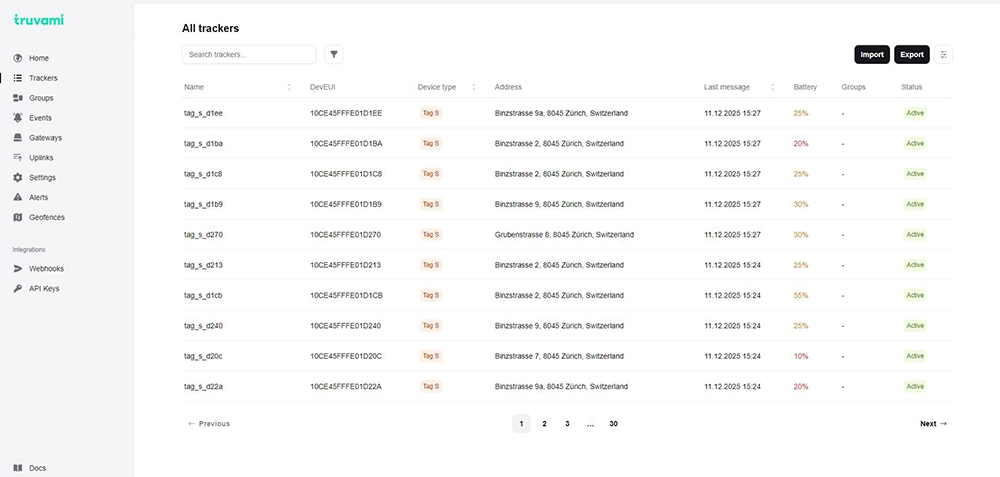
Trackers Table Overview
The main section of the page displays a table listing all trackers. Each row represents a single device
and includes essential attributes such as:
- Name
- DevEUI
- Device type
- Address (last resolved address)
- Last message timestamp
- Battery level
- Groups
- Status (e.g., Active)
The table supports pagination for navigating large deployments.
Search Bar
Located at the top of the page, the search bar allows users to quickly find a device by:
- name
- DevEUI
- device type
This search performs text matching across the table contents.
Group Filter
Next to the search bar, users can filter trackers based on the group they belong to.
Clicking the filter icon opens a dropdown containing:
- a group search field
- a list of all available groups
- color-coded group indicators
- checkboxes for selecting one or multiple groups
Only trackers that belong to the selected groups will be displayed.
Importing Trackers
Clicking the Import button opens a modal that allows batch creation of new trackers.
Import Options
Users can import trackers in two ways:
- Upload a CSV/TSV/XLS/XLSX file
- Paste CSV rows directly into the provided text area
The CSV format may include fields such as: dev_eui, app_eui, app_key.
If both a file and pasted content are provided, the uploaded file takes priority.
Additional Settings
The import dialog also allows selecting:
- Device type (required), e.g.:
- Tag S
- Tag L
- Tag XL
- Nomad XS
- Nomad XL
- Smartlabel
Column Visibility Options
The column visibility menu allows users to customize which fields are shown in the table.
Available columns include:
- DevEUI
- Device type
- Address
- Last message
- Last movement
- Last position
- Battery
- Firmware version
- Groups
- Status
Users can enable or disable individual fields to tailor the table to their operational needs.
Sorting
Most columns in the table support sorting. Clicking a column header sorts the list
ascending or descending based on the selected field (e.g., by name, last message timestamp, battery level).
Pagination
For deployments with many trackers, pagination controls at the bottom of the page allow:
- navigating to next/previous pages
- jumping to specific page numbers